Search This Blog

Followers

Saturday, October 9, 2010

nokia x6 review


Nokia has finally made a touchscreen music phone worth craving with the X6, which is everything the 5800 XpressMusic should have been. Plenty of water has flowed under the bridge since the 5800 was released, and the X6 doesn't break any new ground, but there's still much to like about this music maestro.

Capacitive capability
Nokia struggled to make us crave the 5800, due to its chunky design and unresponsive resistive touchscreen. The X6 feels like the 5800 reborn, with a capacitive touchscreen and sleek, angular body.

The X6 uses a touchscreen-orientated version of Nokia's Symbian operating system, which isn't the smoothest or most user-friendly system out there. For example, you have to tap an option once to open it in some places, and you have to double tap in other places. It's not a huge problem, but it can get annoying.

The X6's capacitive touchscreen makes it feel more responsive than other touchscreen Nokia phones, because you don't have to apply pressure with a fingernail or stylus to get it to respond. Even with its capacitive advantage, the screen could be more responsive, though. At times, we felt the phone took too long to respond, although it isn't the slowest phone we've used by any means.

Music magic
The X6 sports an epic 32GB of memory and Nokia's Comes With Music service, so you can fill it up with a year's worth of free downloads, choosing from zillions of music tracks. The tracks are chained-down with DRM, so you can't listen to them on your other music players, but you can keep them on the phone even if you choose not to renew your subscription to Comes With Music after your free year is up.

Nokia has released yet another version of its desktop syncing software to help you get music on and off the phone, and it's an improvement on previous versions. Now called Nokia Ovi Suite, the software is a good attempt at creating an iTunes-style music store. We found downloading tracks easy, and syncing the phone was surprisingly simple. We particularly like the ability to sync the phone over Bluetooth, so, if your laptop has built-in Bluetooth, you may never have to break out the USB cable once the phone is set up. You can also download tunes directly onto the phone when you're on the move.

Once you've helped yourself to some free music, you can listen to it on your own headphones, thanks to the standard 3.5mm headphone jack. We weren't blown away by the audio quality, though, especially at low volumes, and even when we were using high-end cans. The volume settings also leap too quickly from tinny and quiet to deafeningly loud.

Calls don't benefit from this music phone's pedigree. In our tests, they sounded tinny both to us and the recipients of our calls. Nevertheless, with its huge storage and access to endless free tracks, the X6 makes for a top-notch music phone.

Ovi blown
Music isn't the only thing you can download onto the X6. Slowly but surely, the Ovi Store is developing into a handy place to get apps for Nokia phones. The X6 makes it easy to get started, providing links on the home screen to the Ovi Store and other Ovi features, such as email and an online calendar.

Ovi is still hit and miss. You can't sync your Ovi calendars with other online calendars, like Google's, for example. But it's a good service to have if you want to back up your photos online or manage your contacts on the Web instead of on the phone.

Shutterbug
The X6's 5-megapixel camera is a pleasure to use, thanks to its fast shutter speed. You can capture snapshots without having to wait around, even when shooting at the highest quality settings. For a phone, its photos are excellent too, with bright colors and sharp edges, although they can't compare to photos taken with a proper camera. The two LED photo lights are harsh, but do a good job of illuminating dark situations in which you'd otherwise get no shot at all.

Conclusion
If music is your passion, the Nokia X6 offers an inexhaustible supply of tunes, thanks to its Comes With Music service and huge 32GB of memory. The capacitive touchscreen isn't as zippy as we'd like, but the X6 is a huge improvement on the Nokia 5800 XpressMusic in terms of functionality and looks. An excellent camera and standard 3.5mm headphone jack are the gravy on top of this tasty package. Overall, the X6 is proof that Nokia is sorting out its touchscreen troubles, although it still feels rather late on a scene now crowded with less-expensive touchscreen competitors.

Nokia e72 review


The Nokia E71 was one of our favorite business smartphones thanks to its attractive design and full range of useful features. More than a year on, is its successor, the E72, just as compelling a smartphone? Let's look at the differences between the two to find out.

Design
Given how well-received the form factor of the E71 was, there wasn't a need to change things much in its successor. The E72 has a similar solid metallic feel and is almost the same size and weight at 114 x 59.5 x 10.1mm and 128g. On the front, you get the same landscape-oriented QVGA display, below which lie shortcut buttons and a QWERTY keypad. The shortcut keys surrounding the directional pad are laid out differently, but the ability to access your calendar, contacts and mail in one button press remains intact.


The physical design of the E72 (left) is similar to the original E71's (right).
What must be most significantly different is the directional pad itself. While it shares the same square design with a large selector in the middle, this center button now doubles as an optical navigational pad. So, aside from pressing one of the four direction buttons, it is possible to move cursors by stroking your finger over the selector. This can be annoying as we found ourselves moving the cursor accidentally at times. The application in which it is useful is the browser as it gives better mouse cursor control--clicking on small links can sometimes be a very precise affair. Those who don't like the optical pad can turn it off completely, rendering the directional pad identical to the E71's.

The E72's QWERTY keypad layout doesn't differ much from the E71's. It has a shorter spacebar, making way for two extra keys on the bottom row--a shortcut to select symbols and a dedicated exclamation mark key. As indicated by a diagram on the spacebar, it now doubles as a shortcut to turn the camera light on for use as a flashlight. Pressing and holding the key will activate that useful feature. Though the shape of the keys remains the same, we found the tactile feedback different. Less force is required to depress a button, and consequently, the "springiness" of the keys is reduced. This takes some getting used to if you are switching from an E71 and we can't conclude if it's better or worse--just different.

One of the best changes is the inclusion of a 3.5mm audio port on the top of the device. The E71 had a 2.5mm version which required an adapter if you were using your own pair of headphones. Other connectors remain the same with a dedicated connector for charging and a micro-USB port on the left. One thing it lacks which is present on the E71 is infrared, not too big a loss to most users we reckon.
Features
When it comes to connectivity features, the E72 doesn't differ much from the original. You get the full works including HSDPA, Wi-Fi, Bluetooth and A-GPS for navigation. There are some slight improvements such as a faster 10.2Mbps HSDPA maximum speed and HSUPA for high-speed uploads. Do note that these are highly dependent on the operators' 3.5G network quality, so users may not really feel the impact.

Since the launch of the E71, Nokia has been making improvements in the Symbian S60 3rd edition software. The E72 has convenient features such as transition animations, Ovi Store for downloading third-party applications and built-in support for Microsoft Exchange synchronization. It's important to point out that these features can be activated on the E71, too, by downloading the appropriate updates from Nokia. What makes the experience different is that the E72 is much more responsive thanks to a faster processor. More on that in the Performance section later.


The test shot from the E72 shows decent image quality. (Click for original)
Another improved feature is the inclusion of a 5-megapixel camera, up from the 3.2 megapixels in the E71. In our tests, we found the photo quality much improved with excellent macro shots as one of its highlights, perfect for archiving namecards. Also, you don't have to press the "2" key to activate autofocus, a cumbersome and unintuitive implementation on the E71. Now, simply touching the optical pad will let you focus on your subject, while depressing it will snap the shot.
Performance
The performance of the E72 is where it really shines compared with the E71. Now, the E71 is no slouch and, in fact, was one of the most responsive S60 devices when it was launched. But this Nokia comes with a 600MHz processor that blows the E71 out of the water when it comes to speed. There was no lag felt throughout the menu system and even long contacts and message lists loaded very quickly. This was felt most in the Web browser as you can now scroll around full Web pages before they are fully loaded. There may be software improvements in play here, but we're pretty sure the faster chip has a part in that, too.

The improved speed didn't affect the battery life much. With the same 1,500mAh battery, we got about 2.5 days of use on a single charge. This included phone calls, messaging and occasional use of HSDPA for emails and Twitter updates. We reckon most users will be able to get by on more than a day without recharging.

We had no issues with reception and call quality, and the speakerphone was sufficiently loud for use in quiet situations.

One thing we've brought up time and again over the past year is how the S60 platform feels dated compared with the competition such as the iPhone OS and Google Android. This reduces the value proposition of the E72 slightly, especially when you consider the availability and quality of third-party apps.
Conclusion
As you would have probably gathered by now, the E72 is a very competent business smartphone. Nokia stuck with what worked in the E71 and made a few improvements in the process.

The big question is whether current E71 users should upgrade to the E72. There's no quick answer to that, but if the camera quality and responsiveness of your current smartphone irk you, the E72 would be a good replacement. Otherwise, stick with your E71 because the major features such as a good keypad, push email and decent battery life remain the same.

The E72 is available from operators and stores in Asia at S$750 (US$540). As usual, check with your provider for subsidized prices as these will be significantly lower than retail.

Thursday, October 7, 2010

Dell Streak


Everyone is eager to see a serious competitor for the Apple iPad tablet computer. For the moment, the Dell Streak is the strongest contender we've seen, though its pocket-size design and phone capabilities have us wondering if it shouldn't really be judged as a smartphone. However you want to define it, the Streak's features and design quality are simply too tantalizing to ignore, even if its price ($299 with a two-year AT&T contract, $549 without contract) is tough to swallow.

Design
The most notable aspect of the Dell Streak is its design. Chances are, you already know what Google's Android operating system is capable of, and the Streak's phonelike hardware capabilities (camera, touch screen, memory expansion) are nothing we haven't seen before.

When you pick up a Streak for the first time, the first thing you'll notice is its size. At 6 inches wide, 3.2 inches tall, and 0.35 inch thick, the Streak is about the size as a pocket Moleskine notebook. It breaks the norm for smartphone dimensions, yet it's nearly a third the size of Apple's iPad tablet.

The size charts new territory in the middle ground, and potential buyers should be aware that it does not fit naturally as a replacement for your phone or your laptop. That said, if you're having a Goldilocks moment looking for that "just right" compromise between convenience, portability, and features, the Streak should be at the top of your list for consideration.

Putting the issue of size aside, the design quality of the Streak is solid, and befitting of the $500 price range. The 5-inch capacitive touch screen is covered in a seemingly indestructible Gorilla Glass, developed by Corning, though the tapered edges to the left and right of it use a more conventional scratch-resistant plastic. These same edges also conceal three soft keys (back, menu, home), an earpiece, microphone, and a front-facing VGA-resolution camera. We carried the Streak loosely in a messenger bag for weeks, along with keys, loose change, and an iPod, and failed to make a dent or scratch in its finish.

On the flip side of the Streak you'll find a 5-megapixel autofocus camera with an integrated LED flash. The camera is awkwardly placed, so your left hand tends to obscure the lens when holding the Streak in its prescribed landscape orientation. Anyone with common sense will, of course, reposition their hand before snapping a photo or recording video, but the fingerprints left on the lens through regular use do tend to cloud the image quality.

The back of the Streak also includes a small speaker grille at the edge of a large battery cover. Along with a removable, rechargeable battery, the Streak battery compartment also offers access to a SIM card slot and the included 16GB microSD memory card. Both the SIM and microSD cards can be swapped out quickly, but removing the door to the battery compartment will automatically shut down the Streak as a safety measure. A cold boot after removing the battery cover takes about 40 seconds.

Slim buttons for volume, power, and camera mode run across the top edge of the Streak, along with a standard 3.5mm headphone jack (in-ear headphones come included). Our only complaint with the buttons is that the power and camera buttons have an identical shape and are place directly next to one another, making it easy to confuse them.

Finally, the bottom of the Streak offers a 30-pin connection, which is similar to (but not compatible with) the iPad's. A USB cable compatible with the connection comes included, along with a wall-charging adapter. The 30-pin connection is also compatible with Dell's AV dock accessory, which is sold separately and includes connections for HDMI, mini-USB, and audio line-out.

Features
The Dell Streak fits right in with today's superbly specced Android smartphones. It ships with Android 1.6 installed, which is a little antique compared to the snazzy Android 2.1 OS available on a device like the Motorola Droid X. Dell is promising an over-the-air update to Android 2.2 down the line, but until then, features such as multitouch gestures, multiple e-mail in-boxes, live wallpaper, and Flash video support, are out of reach.

While the Streak doesn't break much new ground in the world of smartphones--as an Android tablet, it's without equal. Similar offerings, such as the Archos 5, or Archos 7 Home Tablet, simply don't have the speed, the specs, or the design quality to match the Streak. They've also all lacked one critical feature: the Android App Market.

The good: The Dell Streak offers an unprecedented combination of processor power, screen size, and design quality. Support for 3G, Wi-Fi, and Bluetooth hit all the wireless sweet spots, while photo, camcorder, and calling capabilities blur the boundaries between tablet and phone.

The bad: Battery life isn't great, the touch-screen keyboard is awkward, music quality is below average, and the position of the camera tends to cloud photos and video.

The bottom line: The Dell Streak is the first Android tablet worth taking seriously, though its size puts it on the fence between tablets and smartphones.The only problem to some will be price.

Olive pad


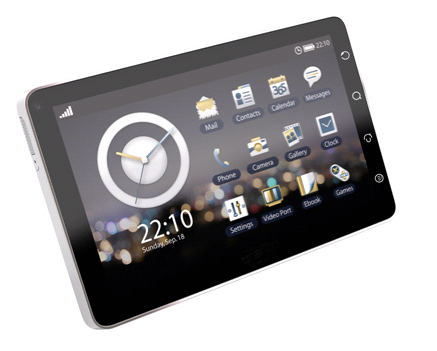
If you are looking to buy a small tablet like the ipad and dont want to be in the chains of apple or dont want to spend that much then the Olive pad is the product you will love
Olive is trying to set its presence in lucrative technology market of India. They introduced a series of mobile phones in India and then they come up with X107H Zip book. Recently they have announced to launch their first Android powered tablet / Slate in India. We are to take a quick review of this new gadget and evaluate its compatibility.

Structure;

Olive pad is equipped with 7 inch screen with a display of 800×480 pixels resolution with 65 K colours. Viewing screen from any angle is comfortable and the olive ipad also support multiple touches. Olive i-pad is very sleek and slim and can adjust in your rear pocket.

If we examine about the locations of the slots and keys, they are well placed and easily accessible. Micro Sd card slot, volume and zoom keys and sim slot are placed on the top of the stereo speakers. Below the speaker of the left side screen lock and power button are provided. 3.5 mm of handfree socket and mini USB port, located at bottom right side, acts as charging port. A 3 megapixel camera (autofocus) is placed at the rear, could be the major problem. Scratches can easily harm its quality. A 3240 mAh Li polymer battery is good.

Features:

Olive i-pad comes with a preloaded Android 2.1. The UI can be customised. Apps, games, UI add ons , social networking applications etc can be downloaded via Android market. It is also equipped with Qualcomm MSM7227 chipset with a 600 MHz processor. Typing is easy because of big screen and this feature further helps in abstracting all the benefits of the Android 2.1 engine.

Media interface and Calls:

You have to use a hand free kit for the receiving calls. Built in speakers are good but microphone is not much supportive. Olive I Pad also has A2DP (stereo Bluetooth) but it drains out your battery life. Peak volume of the speakers is not enough in crowed area. It is easy to sync your music files in any format with Android Music player. MPEG4 and 3GP format videos are acceptable but there is need to convert video for better fit with the size of screen. Gaming is still a area to put emphasis.

Connectivity:

Olive i-pad is a 3.5 g enable device withn options of EDGE/GPRS. Wi-Fi connectivity, and pre installed applications for social networking, Gmail, Gtalk, Twitter and Facebook are excellent travel mate. GPS is another worthy feature. Word documents can be created and PDF reader is also available. Price of Olive ipad is in range of Rs 22000-Rs 25000.

Sony Ericsson Zylo (W20)

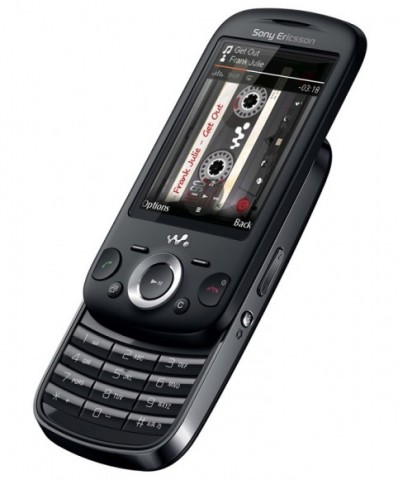
If you like small phones that you can carry around and listen to music and take decent photos and don't want to break the bank then this is the phone you have been looking for. Take a look at the features

Key factors :
Camera 3MP
Bluetooth with A2DP, Yes
Music Player Yes
FM Radio Stereo FM radio with RDS
GPRS Class 10, Yes
EDGE Class 11, Yes
Talk Time up to 5 hours
Video Yes
Form Factor Slider
Wi-Fi No
Phone Book capacity 2000
Memory up to 16GB

Phone Features
Size 103X52X11.5mm
Weight 115 gms
Display Size 2.6 inch
Display Colours 256K TFT
HSC SD NA
Call Records Yes
Ringtones MP3 & MIDI
Network Quad Band & 3G
Standby time Up to 170 Hours
Battery Standard, Lithium
Games 3D, Yes
Java Tech MIDP 2.0
3G Yes (HSDPA)
SMS Yes
MMS Yes
E-mail Yes
WAP Yes
USB cable connection Yes
Operating System JAVA
Head-set Yes
Speaker Phone Yes
GPS No
Geo tagging Yes

Sunday, October 3, 2010

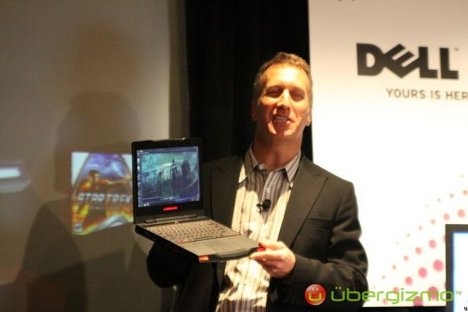
Alienware M11x Review


One of 2010's laptop surprises, the Alienware M11x offered something new to challenge the divide between gaming PCs and regular computers. Pairing gaming graphics with a compact Netbook-size body for a starting price less than $1,000, and battery life that was actually good, this travel-friendly "gaming Netbook" redefined our expectations of what a portable computer could offer.

There were a few drawbacks: in our original review of the Alienware M11x, we noted that the gaming capabilities were good but not great. With a Core 2 Duo ULV CPU, it was a far cry from the blazing speed of its full-fledged and more expensive big brother, the Alienware M15x, and the processor's general capability to multitask was considerably slower than even the lowest-end versions of Intel's new Core i3/i5 laptop processors.

Dell's new iteration of the Alienware M11x, equipped with Intel Core i5 and i7 ULV processors and automatically switching Nvidia graphics with Optimus technology, are now available alongside the original M11x for a slightly higher price. The specs raised expectations for both increased speed and battery life in our review unit, which had a Core i7-U640 CPU and cost $1,299.

Though the new Core i7 ULV version of the Alienware M11x does offer improved operating speeds and frame rates for games, it's not a quantum leap. It's better than its predecessor, but its higher price may scare away mainstream gamers or people looking for better laptop value for their money. Still, if you want a nearly unmatched size-graphics combination, this could be the hybrid you're looking for. If you'd like to save a few hundred dollars, consider giving the still-available Core 2 Duo version of the M11x (which starts at $799) a look. The new Core i5/i7 iterations of the M11x start higher, at $949.

Price as reviewed / starting price $1,299/$949
Processor 1.2 GHz Intel Core i7 U640
Memory 4GB, 800 MHz DDR3
Hard drive 500GB 7,200rpm
Chipset Mobile HM55
Graphics Nvidia GeForce GT 335M (1GB) + Intel GMA HD
Operating System Windows 7 Home Premium (64-bit)
Dimensions (WD) 11.3 inches x 9.2 inches
Height 1.3 inches
Screen size (diagonal) 11.6 inches
System weight / Weight with AC adapter 4.6 / 5.6 pounds
Category Ultraportable


The Alienware M11x is still a relatively thick ultraportable, especially considering that it lacks an optical drive, but the compactness of the Alienware M11x as a gaming machine is hard to beat. Its look is a lot cleaner and more streamlined than larger Alienware products, such as the M15x. Our black model (last time, we reviewed the M11x in silver gray) has a smooth, soft feel and a matte finish. The M11x gives away its Alienware pedigree via a subtle, black, alien-head logo on the back lid, a trademark alien skull above the keyboard, and its racecar-like front face, with somewhat silly LED "headlights." To some degree, the squared-off, bottom-heavy look of the M11x resembles an old-school portable DVD player. Its all-around clean lines make it an easy laptop to slide into a bag.

Opening up smoothly on a plastic hinge that protrudes from an otherwise flush backside, the M11x interior is all black, with a very familiar LED-backlit, multicolor keyboard and an edge-to-edge, glossy, 11.6-inch screen. The sturdy chassis and slightly compressed, but otherwise Alienware-quality, keyboard are much better than average, as is the comfortable, large touch pad. Much like other Alienware laptops, the bold-colored keyboard, grille, and Alienware logo lights can be customized in any of a rainbow of colors, or even set to strobe if you prefer. These effects are set using Alienware apps.

The M11x's 11.6-inch, 1,366x768-pixel resolution screen looks good behind its edge-to-edge glossy veneer, but all that glass on a small screen results in quite a bit of glare, too. With its screen size, the M11x seems made to be plugged into an external monitor, but the 11.6-inch display is actually surprisingly decent for gaming. An immersive assist comes from above-average built-in 5.1 speakers, an astounding array for the M11x's size. Game sound comes off crisp, loud, and good enough to enhance the gaming experience on its own. At maximum volume, the M11x can nearly rock a room.

The M11x still lacks an optical drive; that's an obvious decision to enable this laptop to be so small, but we couldn't help notice the M11x's conspicuously port-free stretch on its right side, which is about the same size as, well, an optical drive. We'll let you draw your own conclusions. While the capability to install games off discs without having to plug in a USB-connected external optical drive would be nice, modern gamers using Steam (preinstalled on the Alienware) or other downloadable software probably never touch discs most of the time anyway.

  Alienware M11x Average for category [Ultraportable]
Video HDMI, DisplayPort VGA plus HDMI or DisplayPort
Audio Stereo speakers, dual headphone jacks, microphone jack Stereo speakers, headphone/microphone jacks
Data 3 USB 2.0, dual SD/Memory Stick card reader, mini-Firewire 3 USB 2.0, SD card reader
Expansion None None
Networking Ethernet, 802.11 b/g/n Wi-Fi, Bluetooth, 3G broadband Ethernet, 802.11n Wi-Fi, Bluetooth, optional mobile broadband
Optical drive None None


Speaking of missing ports, the most impressive feature on this tiny laptop is its support of both HDMI and DisplayPort. VGA has oddly been removed this go-around, though the original M11x boasted all three video options. We do not often use a DisplayPort, and we think VGA might have been a more versatile connection. No ExpressCard slot is provided, but at least the M11x includes Bluetooth (though you can optionally save $20 and leave it out when ordering on Dell's Web site). Our configuration also included Gobi Mobile Broadband supporting Verizon, an $125 extra (an AT&T Gobi card is also available), which also requires a monthly data subscription starting at $39.99.

Under the hood, the new Alienware M11x configurations use either a Core i5 or i7 ULV processor, which amounts to Intel's next-gen evolution of the SU7300 Core 2 Duo ULV CPU that was in the last Alienware M11x we reviewed. The Core 2 ULV M11x is still available from Alienware at a starting price of $799. The new configs start at $949, which gets you a 1.06 Ghz Core i5 520UM ULV processor, 2GB of DDR3 RAM, and a 160GB hard drive. Our top-of-the-line configuration came to slightly more, at $1,299. Upgrading from a Core i5 520UM to the Core i7 640UM CPU costs $150.

The Intel Core i7 640UM processor under the hood of our Alienware M11x is a Core i7 in brand name only: running at half the speed of a normal processor but overclockable in BIOS, the performance of this low-voltage CPU is more akin to what we saw in the Core 2 Duo ULV processor, the SU7300, than what you're likely to get in any other Core i7 machine. This M11x does run faster and better at both single and multitasking benchmarks than its predecessor--about 27-percent faster than the Core 2 Duo ULV M11x in our multitasking benchmarks, for instance--but it still lags behind standard-voltage Core i-series processors. That being said, it's plenty fast for accomplishing most tasks, especially on its smaller 11.6-inch screen.

A powerful but not top-of-the-line Nvidia GeForce GT 335M graphics card with 1GB of RAM is the M11x's real secret weapon, giving it enough gaming power to handle most mainstream titles. The older version of the M11x used switchable graphics to alternate between discrete power and battery-saving integrated Intel graphics, but the software switch was manually operated. This M11x finally has newer on-the-fly Optimus graphics-switching technology, which handles the graphics switch seamlessly for the most part. The effect is invisible, except in a few instances: a demo of Kane & Lynch 2 didn't trigger a graphics switch-over, which requires right-clicking on the .exe file to add the profile to Nvidia's Optimus settings. (Optimus keeps an updated profile library for all programs for which it needs to activate graphics.)

In addition to making things a little easier, the new graphics setup performed better than the original M11x. The current M11x ran Unreal Tournament III's benchmark test at 84.2 frames per second in native 1,366x768-pixel resolution, as opposed to 69.5fps from the Core 2 Duo ULV M11x. We also tried Mass Effect 2 and Kane and Lynch 2 and found them to run excellently. The M11x isn't a top-flight gaming laptop, because of its slower-than-average ULV processor and just-short-of-elite graphics, but for its size it can't be beaten.

The M11x also outputs to external monitors at up to 1,920x1,080-pixel resolution, via HDMI or DisplayPort-out (VGA has been removed from the Core i5/i7 M11x). Our results were a little better than they were on the original M11x, as would be expected; full 1080p gaming on Mass Effect 2 wasn't buttery smooth, but 1,600x900-pixel resolution looked surprisingly strong.

So in short this is a must have for any Gamer. and this is the smallest true gaming laptop that you can buy. It is a bit on the expensive side but who said that the best things in life have to be cheap.

Friday, October 1, 2010

Nokia ovi store hits 2.3 million daily


After almost a year and a half, Nokia's Ovi Store has built up enough momentum to hit 2.3 million daily downloads, the company announced today.

With the number of active Nokia phone customers at 140 million around the world, 200,000 users are now signing up at the Ovi Store on a daily basis, Nokia noted.

Among the developers and publishers who create the mobile apps, 70 of them have gone past 1 million downloads. It's a list that includes Electronic Arts, Gameloft, Indiagames, PepsiCo, HeroCraft, and Offscreen Technologies. HeroCraft's Farm Frenzy game has enjoyed more than 10 million downloads, according to Nokia, while Offscreen's touch-screen apps have taken home more than 45 million downloads.

Launched in May 2009, the Ovi Store was designed to be Nokia's answer to Apple's App Store. But Nokia's app store has received some dings for its lack of user friendliness. The company just revamped the look and feel of the Ovi Store, initially seen only through the new N8 smartphone and then rolling out to other Symbian smartphones. The new store promises a friendlier experience and easier ways to track down content.

The Ovi Store has also typically lacked the wealth and depth of apps found in Apple's App Store and even Google's Android Market. One problem is that developers have been more keen to create mobile apps for the lucrative iPhone and Android platforms. To counter that, Nokia has been providing developers with new tools and benefits, improved revenue sharing, better analytics, and easier ways for users to buy their apps.

Another problem is that Nokia has focused on its global business at the expense of the U.S. and North American markets. To attract more developers and reach out to this market all in one shot, Nokia recently announced a $10 million contest to encourage developers to create apps specifically for customers in North America.