It's a mixed bag with the N8. It feels like we're writing about an old friend we've known for a while now. But the smartphone has just been made official as the first device running Symbian^3
Symbian^3
Symbian 3, marketed as Symbian^3, isn't the end-road we're looking forward to... that'd be Symbian^4. Instead, this version of the Symbian operating system is a prelude to Symbian 4, with a software overhaul scheduled to be completed by the end of the year. The enhancements with Symbian 3 are in three key areas: User interface, multimedia and performance. We lambasted the single- and double-tap confusion when we reviewed the 5800 XpressMusic, N97 and N97 mini. It felt as if we were flogging a dead horse back then. Symbian 3 finally addresses this issue by shifting to a single-tap interaction model while adding support for multitouch gestures on the capacitive touchscreen. We don't want to jump the gun here since we haven't had the chance to waddle though the menus yet. But if the briefing material is to be believed, there's a good chance Nokia has finally gotten it right with one of the biggest pain points with earlier devices.
The software has also enabled the multiple home screens feature so users can swipe across the display to switch between three customizable panels, with widgets to access the music player, emails, contacts, news feed and social-networking applications. We'd imagine the look and feel of this to be similar to the Maemo home screen interface on the N900.
Multimedia also plays a huge role in Symbian 3 with support for HDMI output, which means you'll be able to plug the phone into a TV and watch an HD video sans a Blu-ray player. According to Nokia, video playback via the HDMI adapter cable is rated for 6 hours, though we're not sure if the accessory will be bundled or it has to be purchased separately. The N8 also has 2D and 3D graphics acceleration, so it should, at least in theory, be capable of running high-performance and graphics-intensive mobile games.
Finally, in terms of performance, Nokia claims the N8 is more efficient when it comes to memory management, which means more applications can run at the same time. The N900 is a good example of this. So if the same kind of experience can be ported over to the N8, it should be something to lookout for. For the record, the N8 has 256MB of RAM and a 512MB ROM.
Features
Aside from Symbian 3, the N8 is also Nokia's first handset that's integrated with Qt. To end-users, this probably doesn't mean anything. But for developers, the software development environment lets them write applications and use these across different platforms with minimal modification.The screen is a new kind of screen form Nokia which is scratch resistant even if you try to scratch it with a key. wow thats cool just what we need.
The N8 takes 12-megapixel pictures and 720p high-definition videos at 25fps. The camera has an aperture of F2.8, focal length of 5.4mm and a Xenon flash. According to Nokia, the N8 is its first 12-megapixel camera-phone and the company claims that the image sensor used is bigger than many of those found in dedicated digicams. So it'd be interesting to see how the shooter performs in low-light conditions.
The capacitive touchscreen measures 3.5 inches diagonally and has a resolution of 640 x 360 pixels. One thing Nokia smartphones have never lacked is their suite of connectivity features. The quad-band GSM N8 also supports quad-band WCDMA, Wi-Fi (b/g/n), Bluetooth stereo and Assisted-GPS. It also comes with free walk and drive navigation as well as Lonely Planet and Michelin guides on Ovi Maps.
According to Nokia, users can watch Web TV from channels such as CNN, E! Entertainment, Paramount and National Geographic on the home screen. Local content, on the other hand, can be accessed from the Ovi Store. There are already 2000 apps on it for N8
Wrapping up this section is the 16GB of onboard memory with the option to increase that to 48GB via the microSD expansion card slot. The N8 also has the ability to act as a USB host for transferring data to another USB device.It also supports Usb on the go ... using this you can connect any usb storage device including usb sticks and also otherphones.for more read the Usb on the go post.
Outlook
While it's easy to get carried away with the enhancements of Symbian 3, it also serves as a reminder that nothing else has changed fundamentally. We are still looking for an overhaul in the Symbian user interface and that's still many months away. Symbian 3 is a stop-gap solution, just as Windows Mobile 6.5 was for Windows Phone 7. It may be better, but meanwhile, competing software are also improving at the same time. this device is available for 26,265 which is a great price for this device. In short I would suggest to buy this phone if you are looking for a great media phone.
Search This Blog
Followers
Blog Archive
Saturday, October 16, 2010
Thursday, October 14, 2010
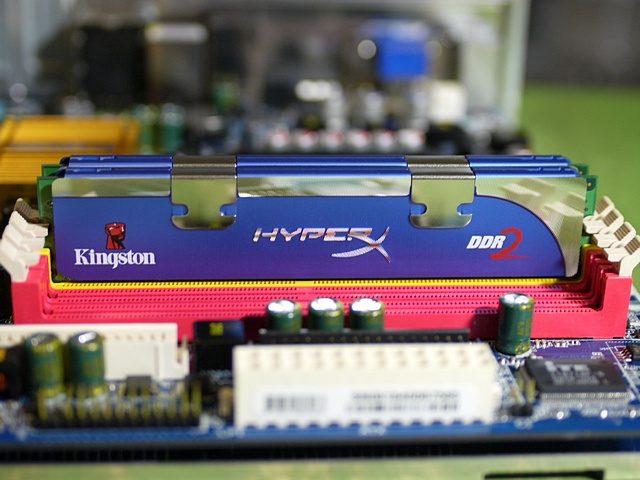
Kingston HyperX review
Kingston is one of the larger memory vendors and has long offered upgrade kits and enthusiast memory, along with related products such as flash memory devices.We are reviewing a 4 GB DDR2 memory kit, HyperX kit with two 2 GB DDR2 DIMMs called KHX8500D2K2-4G, from which you can already tell these are PC2-8500 DIMMs (DDR2-1066 speed). The HyperX family is Kingston’s product line for enthusiasts, and there are DDR, DDR2 and DDR3 memory kits available. However, Kingston does not belong to the group of memory vendors that races for maximum clock speeds. This isn’t really a bad thing. In fact, Kingston is actually the only memory company that provides a truly solid technical specification sheet. You can get information on Kingston products on the corporate website www.kingston.com, while there is a microsite to deal with the HyperX line.
Package, Specifications
Believe it or not, we really liked the way Kingston boxed its memory. Both DIMMs fit into an anti-static plastic box with a clear cover, which is sealed with the product specifications. That’s not as fancy as a huge color box, but it’s as much as you really need to box a pair of memory modules. Both DIMMs are inserted in such a way that prospective buyers can examine the product stickers. These tell you about the part number and the voltage specification (2.2 V in the case of our test samples), but they don’t tell you anything about memory latencies. Only CL5-5-5-15 timings are supported, at 1.8 V default voltage or at 2.2 V maximum voltage. The SPD ROM is programmed to run the memory at DDR2-800 speed, 1.8 V and CL5-5-5-15 timings, which are the default values.
Overclocking
We started our overclocking attempts at the default DDR2-1066 voltage of 2.2 V, which didn’t take us much further than the default speed. However, a slight increase to 2.3 V helped to reach DDR2-1130 reliably. Any faster speed would result in the system becoming unstable.
Kingston provides an amazingly attractive price for performance within the expected range. If you can live with the fact that it doesn’t overclock much
Package, Specifications
Believe it or not, we really liked the way Kingston boxed its memory. Both DIMMs fit into an anti-static plastic box with a clear cover, which is sealed with the product specifications. That’s not as fancy as a huge color box, but it’s as much as you really need to box a pair of memory modules. Both DIMMs are inserted in such a way that prospective buyers can examine the product stickers. These tell you about the part number and the voltage specification (2.2 V in the case of our test samples), but they don’t tell you anything about memory latencies. Only CL5-5-5-15 timings are supported, at 1.8 V default voltage or at 2.2 V maximum voltage. The SPD ROM is programmed to run the memory at DDR2-800 speed, 1.8 V and CL5-5-5-15 timings, which are the default values.
Overclocking
We started our overclocking attempts at the default DDR2-1066 voltage of 2.2 V, which didn’t take us much further than the default speed. However, a slight increase to 2.3 V helped to reach DDR2-1130 reliably. Any faster speed would result in the system becoming unstable.
Kingston provides an amazingly attractive price for performance within the expected range. If you can live with the fact that it doesn’t overclock much
Wednesday, October 13, 2010
I got a new phone
I was having issues with the nokia n97 browser and also with the software.
Dont get me wrong its a great phone but it was not the perfect one for me as the software let it down. the hardware part was right but the software was weak. I have to do a lot of multitasking and it was giving me out of ram issue.!! So I had decided to get another phone to be my primary phone.
As you know really digging the nokia n900 Nokia's pocket computer and on using the device I was impressed. And the device is a great for multitasking. So good that it can run 50 applications and still no lagg. How it is able to to do this is it has a total of 1gb or ram (256 fixed and 786 shared page). It is one of the only phones I have seen that has septate graphics and audio chip. so you can see its a real computer with phone built around it. There in lies the only problem. its great as a tablet and trust me there is nothing I found in the price range that can beat it. And trust me it totally kicks the apple Ipads butt. And there is nothing that can beat its multitasking capability. And the web browsing is the best you can ever find. That being said it lacks some basic stuff. you can say its rough around the edges. thats cause its a basic phone built around a computer.And there are some issues with the software. Like the music player is great but it lacks a equalizer. and many other bugs. You will say its Linux and you can program it easily but i am paying the full cost of the phone and why should i get a incomplete phone that i have to work on to complete.
So then I was hunting for the new phone.. I wanted something that will let me work online just as good as on a pc, and it should also let me stay connected with my social accounts and my email. push mail to be precise and last and not the least let me stay online 24x7 on my IMs and skype calls .
I got the answer in the form of Nokia E72. You might be thinking that i am only looking for Nokia.. no I was in the market looking at every brand available, at prices till 1000$ and this was the best one i could get. and dint cost me much either. I have used the phone for a Day now and the phone is a great phone both as a phone and a internet device. The internet browser is so good on the phone that i am actually effortlessly creating this entire post on the device. The camera is a 5 mp and its really great. really impressed by it. the screen is very sharp.The phone easily fits into my pocket and is very light. It is a dream because of this. at the end of the day the more pocket-able the phone is the more easy you will use it. I am very happy with it so far. Many people were saying that they are getting freezeups on the phone but I have not even had one yet. Its never given me out of ram issue like the nokia N97 and the battery life is very nice. The phone is able to do a lot of multitasking without a sweat. I was able to use nokia maps IM client , Mail client , music player , and web browser all together and that dint cause any problems to the phone. Email client on the phone is a dream. navigation is very nice.and the phone is ready for all this out of the box and you dont have to install anything on the phone for all this stuff. Thats a good thing. The audio quality is better than many music phones and even standalone music players. so in short i am very happy with this phone... i will tell you more about it and my impressions and if any problems in a later post.
As you know really digging the nokia n900 Nokia's pocket computer and on using the device I was impressed. And the device is a great for multitasking. So good that it can run 50 applications and still no lagg. How it is able to to do this is it has a total of 1gb or ram (256 fixed and 786 shared page). It is one of the only phones I have seen that has septate graphics and audio chip. so you can see its a real computer with phone built around it. There in lies the only problem. its great as a tablet and trust me there is nothing I found in the price range that can beat it. And trust me it totally kicks the apple Ipads butt. And there is nothing that can beat its multitasking capability. And the web browsing is the best you can ever find. That being said it lacks some basic stuff. you can say its rough around the edges. thats cause its a basic phone built around a computer.And there are some issues with the software. Like the music player is great but it lacks a equalizer. and many other bugs. You will say its Linux and you can program it easily but i am paying the full cost of the phone and why should i get a incomplete phone that i have to work on to complete.
So then I was hunting for the new phone.. I wanted something that will let me work online just as good as on a pc, and it should also let me stay connected with my social accounts and my email. push mail to be precise and last and not the least let me stay online 24x7 on my IMs and skype calls .
I got the answer in the form of Nokia E72. You might be thinking that i am only looking for Nokia.. no I was in the market looking at every brand available, at prices till 1000$ and this was the best one i could get. and dint cost me much either. I have used the phone for a Day now and the phone is a great phone both as a phone and a internet device. The internet browser is so good on the phone that i am actually effortlessly creating this entire post on the device. The camera is a 5 mp and its really great. really impressed by it. the screen is very sharp.The phone easily fits into my pocket and is very light. It is a dream because of this. at the end of the day the more pocket-able the phone is the more easy you will use it. I am very happy with it so far. Many people were saying that they are getting freezeups on the phone but I have not even had one yet. Its never given me out of ram issue like the nokia N97 and the battery life is very nice. The phone is able to do a lot of multitasking without a sweat. I was able to use nokia maps IM client , Mail client , music player , and web browser all together and that dint cause any problems to the phone. Email client on the phone is a dream. navigation is very nice.and the phone is ready for all this out of the box and you dont have to install anything on the phone for all this stuff. Thats a good thing. The audio quality is better than many music phones and even standalone music players. so in short i am very happy with this phone... i will tell you more about it and my impressions and if any problems in a later post.
Saturday, October 9, 2010
Google Sync
Millions of people are addicted to using Gmail and a variety of other Google services such as Calendar and Contacts. If you’re one of them, you no doubt have wished for a way to wirelessly sync your phone to your computer.
Today Google has granted your wish in the form of Google Sync. If you have an iPhone, BlackBerry, Nokia Series 60, Windows Mobile, Sony Ericsson, or Nokia standard phone, you can now sync your Google Contacts and Calendar with your mobile phone of choice, wirelessly, and for free.
I’ve heard from a number of people already how great it is to finally sync their Google stuff wirelessly. The only caution that keeps coming up, though, is that Google wipes out your data on your device first, so make sure to run a backup before you use the software.
This is definitely interesting timing by Google especially since Microsoft mistakenly announced its new My Phone service, which will do the same and more, but just for Windows Mobile phones. Google’s offering covers a wide variety of phones, including Windows Mobile, so it will definitely be interesting to see what happens next.
I’ve been using Hosted Exchange for a while now. Since I pay for that service and Google’s and Microsoft’s new services are free, I think I’ll give them a shot and see how they compare.
It supports all kinds of phones and you can get your contacts from one platform to another without much issues,.. its a gr8 tool to manage your contacts and backup too.
nokia x6 review
Nokia has finally made a touchscreen music phone worth craving with the X6, which is everything the 5800 XpressMusic should have been. Plenty of water has flowed under the bridge since the 5800 was released, and the X6 doesn't break any new ground, but there's still much to like about this music maestro.
Capacitive capability
Nokia struggled to make us crave the 5800, due to its chunky design and unresponsive resistive touchscreen. The X6 feels like the 5800 reborn, with a capacitive touchscreen and sleek, angular body.
The X6 uses a touchscreen-orientated version of Nokia's Symbian operating system, which isn't the smoothest or most user-friendly system out there. For example, you have to tap an option once to open it in some places, and you have to double tap in other places. It's not a huge problem, but it can get annoying.
The X6's capacitive touchscreen makes it feel more responsive than other touchscreen Nokia phones, because you don't have to apply pressure with a fingernail or stylus to get it to respond. Even with its capacitive advantage, the screen could be more responsive, though. At times, we felt the phone took too long to respond, although it isn't the slowest phone we've used by any means.
Music magic
The X6 sports an epic 32GB of memory and Nokia's Comes With Music service, so you can fill it up with a year's worth of free downloads, choosing from zillions of music tracks. The tracks are chained-down with DRM, so you can't listen to them on your other music players, but you can keep them on the phone even if you choose not to renew your subscription to Comes With Music after your free year is up.
Nokia has released yet another version of its desktop syncing software to help you get music on and off the phone, and it's an improvement on previous versions. Now called Nokia Ovi Suite, the software is a good attempt at creating an iTunes-style music store. We found downloading tracks easy, and syncing the phone was surprisingly simple. We particularly like the ability to sync the phone over Bluetooth, so, if your laptop has built-in Bluetooth, you may never have to break out the USB cable once the phone is set up. You can also download tunes directly onto the phone when you're on the move.
Once you've helped yourself to some free music, you can listen to it on your own headphones, thanks to the standard 3.5mm headphone jack. We weren't blown away by the audio quality, though, especially at low volumes, and even when we were using high-end cans. The volume settings also leap too quickly from tinny and quiet to deafeningly loud.
Calls don't benefit from this music phone's pedigree. In our tests, they sounded tinny both to us and the recipients of our calls. Nevertheless, with its huge storage and access to endless free tracks, the X6 makes for a top-notch music phone.
Ovi blown
Music isn't the only thing you can download onto the X6. Slowly but surely, the Ovi Store is developing into a handy place to get apps for Nokia phones. The X6 makes it easy to get started, providing links on the home screen to the Ovi Store and other Ovi features, such as email and an online calendar.
Ovi is still hit and miss. You can't sync your Ovi calendars with other online calendars, like Google's, for example. But it's a good service to have if you want to back up your photos online or manage your contacts on the Web instead of on the phone.
Shutterbug
The X6's 5-megapixel camera is a pleasure to use, thanks to its fast shutter speed. You can capture snapshots without having to wait around, even when shooting at the highest quality settings. For a phone, its photos are excellent too, with bright colors and sharp edges, although they can't compare to photos taken with a proper camera. The two LED photo lights are harsh, but do a good job of illuminating dark situations in which you'd otherwise get no shot at all.
Conclusion
If music is your passion, the Nokia X6 offers an inexhaustible supply of tunes, thanks to its Comes With Music service and huge 32GB of memory. The capacitive touchscreen isn't as zippy as we'd like, but the X6 is a huge improvement on the Nokia 5800 XpressMusic in terms of functionality and looks. An excellent camera and standard 3.5mm headphone jack are the gravy on top of this tasty package. Overall, the X6 is proof that Nokia is sorting out its touchscreen troubles, although it still feels rather late on a scene now crowded with less-expensive touchscreen competitors.
Nokia e72 review
The Nokia E71 was one of our favorite business smartphones thanks to its attractive design and full range of useful features. More than a year on, is its successor, the E72, just as compelling a smartphone? Let's look at the differences between the two to find out.
Design
Given how well-received the form factor of the E71 was, there wasn't a need to change things much in its successor. The E72 has a similar solid metallic feel and is almost the same size and weight at 114 x 59.5 x 10.1mm and 128g. On the front, you get the same landscape-oriented QVGA display, below which lie shortcut buttons and a QWERTY keypad. The shortcut keys surrounding the directional pad are laid out differently, but the ability to access your calendar, contacts and mail in one button press remains intact.
The physical design of the E72 (left) is similar to the original E71's (right).
What must be most significantly different is the directional pad itself. While it shares the same square design with a large selector in the middle, this center button now doubles as an optical navigational pad. So, aside from pressing one of the four direction buttons, it is possible to move cursors by stroking your finger over the selector. This can be annoying as we found ourselves moving the cursor accidentally at times. The application in which it is useful is the browser as it gives better mouse cursor control--clicking on small links can sometimes be a very precise affair. Those who don't like the optical pad can turn it off completely, rendering the directional pad identical to the E71's.
The E72's QWERTY keypad layout doesn't differ much from the E71's. It has a shorter spacebar, making way for two extra keys on the bottom row--a shortcut to select symbols and a dedicated exclamation mark key. As indicated by a diagram on the spacebar, it now doubles as a shortcut to turn the camera light on for use as a flashlight. Pressing and holding the key will activate that useful feature. Though the shape of the keys remains the same, we found the tactile feedback different. Less force is required to depress a button, and consequently, the "springiness" of the keys is reduced. This takes some getting used to if you are switching from an E71 and we can't conclude if it's better or worse--just different.
One of the best changes is the inclusion of a 3.5mm audio port on the top of the device. The E71 had a 2.5mm version which required an adapter if you were using your own pair of headphones. Other connectors remain the same with a dedicated connector for charging and a micro-USB port on the left. One thing it lacks which is present on the E71 is infrared, not too big a loss to most users we reckon.
Features
When it comes to connectivity features, the E72 doesn't differ much from the original. You get the full works including HSDPA, Wi-Fi, Bluetooth and A-GPS for navigation. There are some slight improvements such as a faster 10.2Mbps HSDPA maximum speed and HSUPA for high-speed uploads. Do note that these are highly dependent on the operators' 3.5G network quality, so users may not really feel the impact.
Since the launch of the E71, Nokia has been making improvements in the Symbian S60 3rd edition software. The E72 has convenient features such as transition animations, Ovi Store for downloading third-party applications and built-in support for Microsoft Exchange synchronization. It's important to point out that these features can be activated on the E71, too, by downloading the appropriate updates from Nokia. What makes the experience different is that the E72 is much more responsive thanks to a faster processor. More on that in the Performance section later.
The test shot from the E72 shows decent image quality. (Click for original)
Another improved feature is the inclusion of a 5-megapixel camera, up from the 3.2 megapixels in the E71. In our tests, we found the photo quality much improved with excellent macro shots as one of its highlights, perfect for archiving namecards. Also, you don't have to press the "2" key to activate autofocus, a cumbersome and unintuitive implementation on the E71. Now, simply touching the optical pad will let you focus on your subject, while depressing it will snap the shot.
Performance
The performance of the E72 is where it really shines compared with the E71. Now, the E71 is no slouch and, in fact, was one of the most responsive S60 devices when it was launched. But this Nokia comes with a 600MHz processor that blows the E71 out of the water when it comes to speed. There was no lag felt throughout the menu system and even long contacts and message lists loaded very quickly. This was felt most in the Web browser as you can now scroll around full Web pages before they are fully loaded. There may be software improvements in play here, but we're pretty sure the faster chip has a part in that, too.
The improved speed didn't affect the battery life much. With the same 1,500mAh battery, we got about 2.5 days of use on a single charge. This included phone calls, messaging and occasional use of HSDPA for emails and Twitter updates. We reckon most users will be able to get by on more than a day without recharging.
We had no issues with reception and call quality, and the speakerphone was sufficiently loud for use in quiet situations.
One thing we've brought up time and again over the past year is how the S60 platform feels dated compared with the competition such as the iPhone OS and Google Android. This reduces the value proposition of the E72 slightly, especially when you consider the availability and quality of third-party apps.
Conclusion
As you would have probably gathered by now, the E72 is a very competent business smartphone. Nokia stuck with what worked in the E71 and made a few improvements in the process.
The big question is whether current E71 users should upgrade to the E72. There's no quick answer to that, but if the camera quality and responsiveness of your current smartphone irk you, the E72 would be a good replacement. Otherwise, stick with your E71 because the major features such as a good keypad, push email and decent battery life remain the same.
The E72 is available from operators and stores in Asia at S$750 (US$540). As usual, check with your provider for subsidized prices as these will be significantly lower than retail.
Thursday, October 7, 2010
Dell Streak
Everyone is eager to see a serious competitor for the Apple iPad tablet computer. For the moment, the Dell Streak is the strongest contender we've seen, though its pocket-size design and phone capabilities have us wondering if it shouldn't really be judged as a smartphone. However you want to define it, the Streak's features and design quality are simply too tantalizing to ignore, even if its price ($299 with a two-year AT&T contract, $549 without contract) is tough to swallow.
Design
The most notable aspect of the Dell Streak is its design. Chances are, you already know what Google's Android operating system is capable of, and the Streak's phonelike hardware capabilities (camera, touch screen, memory expansion) are nothing we haven't seen before.
When you pick up a Streak for the first time, the first thing you'll notice is its size. At 6 inches wide, 3.2 inches tall, and 0.35 inch thick, the Streak is about the size as a pocket Moleskine notebook. It breaks the norm for smartphone dimensions, yet it's nearly a third the size of Apple's iPad tablet.
The size charts new territory in the middle ground, and potential buyers should be aware that it does not fit naturally as a replacement for your phone or your laptop. That said, if you're having a Goldilocks moment looking for that "just right" compromise between convenience, portability, and features, the Streak should be at the top of your list for consideration.
Putting the issue of size aside, the design quality of the Streak is solid, and befitting of the $500 price range. The 5-inch capacitive touch screen is covered in a seemingly indestructible Gorilla Glass, developed by Corning, though the tapered edges to the left and right of it use a more conventional scratch-resistant plastic. These same edges also conceal three soft keys (back, menu, home), an earpiece, microphone, and a front-facing VGA-resolution camera. We carried the Streak loosely in a messenger bag for weeks, along with keys, loose change, and an iPod, and failed to make a dent or scratch in its finish.
On the flip side of the Streak you'll find a 5-megapixel autofocus camera with an integrated LED flash. The camera is awkwardly placed, so your left hand tends to obscure the lens when holding the Streak in its prescribed landscape orientation. Anyone with common sense will, of course, reposition their hand before snapping a photo or recording video, but the fingerprints left on the lens through regular use do tend to cloud the image quality.
The back of the Streak also includes a small speaker grille at the edge of a large battery cover. Along with a removable, rechargeable battery, the Streak battery compartment also offers access to a SIM card slot and the included 16GB microSD memory card. Both the SIM and microSD cards can be swapped out quickly, but removing the door to the battery compartment will automatically shut down the Streak as a safety measure. A cold boot after removing the battery cover takes about 40 seconds.
Slim buttons for volume, power, and camera mode run across the top edge of the Streak, along with a standard 3.5mm headphone jack (in-ear headphones come included). Our only complaint with the buttons is that the power and camera buttons have an identical shape and are place directly next to one another, making it easy to confuse them.
Finally, the bottom of the Streak offers a 30-pin connection, which is similar to (but not compatible with) the iPad's. A USB cable compatible with the connection comes included, along with a wall-charging adapter. The 30-pin connection is also compatible with Dell's AV dock accessory, which is sold separately and includes connections for HDMI, mini-USB, and audio line-out.
Features
The Dell Streak fits right in with today's superbly specced Android smartphones. It ships with Android 1.6 installed, which is a little antique compared to the snazzy Android 2.1 OS available on a device like the Motorola Droid X. Dell is promising an over-the-air update to Android 2.2 down the line, but until then, features such as multitouch gestures, multiple e-mail in-boxes, live wallpaper, and Flash video support, are out of reach.
While the Streak doesn't break much new ground in the world of smartphones--as an Android tablet, it's without equal. Similar offerings, such as the Archos 5, or Archos 7 Home Tablet, simply don't have the speed, the specs, or the design quality to match the Streak. They've also all lacked one critical feature: the Android App Market.
The good: The Dell Streak offers an unprecedented combination of processor power, screen size, and design quality. Support for 3G, Wi-Fi, and Bluetooth hit all the wireless sweet spots, while photo, camcorder, and calling capabilities blur the boundaries between tablet and phone.
The bad: Battery life isn't great, the touch-screen keyboard is awkward, music quality is below average, and the position of the camera tends to cloud photos and video.
The bottom line: The Dell Streak is the first Android tablet worth taking seriously, though its size puts it on the fence between tablets and smartphones.The only problem to some will be price.
Subscribe to:
Posts (Atom)