Search This Blog

Followers

Monday, October 18, 2010

Xperia X8

The Xperia X8

Specifications


General 2G Network GSM 850 / 900 / 1800 / 1900
3G Network HSDPA 900 / 2100
  HSDPA 850 / 1900 / 2100


Size Dimensions 99 x 54 x 15 mm
Weight 104 g
Display Type TFT capacitive touchscreen, 16M colors
Size 320 x 480 pixels, 3.0 inches
  - Scratch-resistant surface
- Accelerometer sensor for UI auto-rotate
- Proximity sensor for auto turn-off
- Timescape UI
Sound Alert types Vibration, MP3 ringtones
Speakerphone Yes
  - 3.5 mm audio jack
Memory Phonebook Practically unlimited entries and fields, Photocall
Call records Practically unlimited
Internal 128 MB storage, 168 MB RAM
Card slot microSD, up to 16GB, 2GB included, buy memory
Data GPRS Class 10 (4+1/3+2 slots), 32 - 48 kbps
EDGE Class 10, 236.8 kbps
3G HSDPA
WLAN Wi-Fi 802.11 b/g
Bluetooth Yes, v2.1 with A2DP
Infrared port No
USB Yes, v2.0 microUSB
Camera Primary 3.15 MP, 2048x1536 pixels
Features Geo-tagging
Video Yes, VGA@30fps
Secondary No
Features OS Android OS, v1.6 (Donut)
CPU Qualcomm MSM7227 600 MHz processor
Messaging SMS (threaded view), MMS, Email, Push email, IM
Browser HTML
Radio Stereo FM radio with RDS
Games Yes
Colors White, Dark Blue/ White, Aqua Blue/ White, Pink/ White, Silver/ White
GPS Yes, with A-GPS support
Java Yes, via third-party application
  - Digital compass
- MP4/H.263/H.264/WMV player
- MP3/eAAC+/WMA/WAV player
- TrackID music recognition
- Google Search, Maps, Gmail,
YouTube, Calendar, Google Talk
- Facebook app
Battery Standard battery, Li-Po 1200 mAh
Stand-by Up to 446 h (2G) / Up to 476 h (3G)
Talk time Up to 4 h 45 min (2G) / Up to 5 h 40 min (3G)
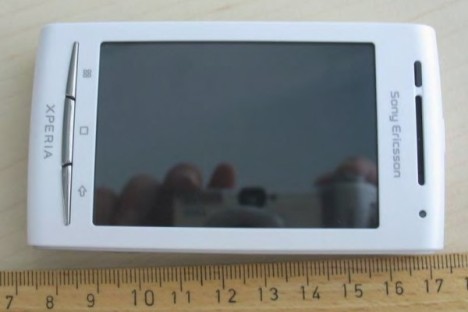
As you can see its like a baby brother to the X10 and still bigger than the X10 mini in terms of size. I am not sure where sony were trying to put this product.

Upsides

With its trade-off between, size, power and price, the Xperia X8 could be the biggest seller for Sony Ericsson this year. It features a similar full touchscreen interface like its big daddy Xperia X10, but the screen will be a smaller 3 inches as compared with the X10's monstrous 4-inch display. This shaving down in size will also affect the overall screen resolution, with the X8 sporting an HVGA (480x360 pixels) resolution.These may seem like downsides rather than upsides for a prospective phone buyer, but the really good news is that Sony Ericcson plans to keep the handset cost down and so the phone is availabe for 14000 Rs thats between the X10 and the X10 mini


Downsides
Well the First and most dominent downside is android 1.6 and then comes the 3.2 mp camera without flash. There is also no media-scape.I also did find the processor to be a little slugish for android as its only 600 mz and it shows.

Lg Optimus7 impressions


Well as you all know Windows phone 7 is out and Lg Optimus7  is one of the first ones to come out with it. 

The Optimus measures at 125 x 59.8 x 11.5mm and has a 3.8-inch capacitive touchscreen display with a resolution of 800 x 480 pixels. It has a 5 megapixel camera with an LED flash and is capable of recording videos in 720p resolution and interestingly can also take 360-degree panoramic shots. Among the usual suspects, the phone has a 3.5mm headphone jack, accelerometer, proximity sensor, ambient light sensor and a digital compass, par for the course for a high-end device, which is what all Windows Phone 7 devices are going to be considering the OS's rather high hardware requirements.


Apart from the built-in Windows Phone 7 features, LG has also added a few of their own. These include the DLNA based Play To, which lets you access content on your phone on other DLNA compatible devices, such as a TV, Scansearch application which lets you take pictures of things and search online for more information and Voice-To-Text, which is pretty self-explanatory.

I feel the phone looks cool and pocket-able. well only time will say how it will fair in the market. the phone is rock solid but the only issue I had was with windows mobile 7 interface itself, but i am sure Microsoft will solve it ... well hope so...

Saturday, October 16, 2010

Netgear N150 Wireless Modem Router DGN1000 review

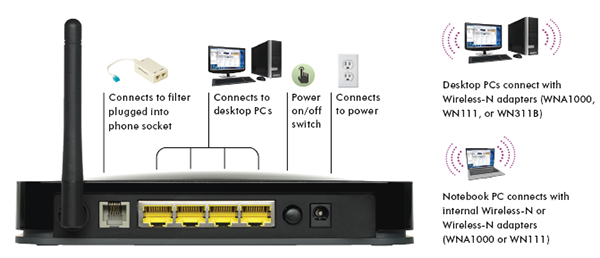
I got this router a day ago as my old one was giving me issues. It  has four 10/100 Ethernet ports, a built-in firewall, parental filters and the Netgear N150 Wireless Modem Router DGN1000 even has physical buttons for controlling the state of the wireless network.
Its connection speed tops out at 150 megabits per second rather than 300Mbs So its not the one for you if you want to transfer a lot of files here and there across your home network but if what you want is just sharing your Internet wireless across some devices and getting sharing a few files here and there.. this one will be perfect for you. The speed is enough to stream video across your network.

The modem in the Netgear N150 Wireless Modem Router DGN1000 performed very well from my test location, which uses an  ADSL2+ connection. We averaged a download speed of 16.595Mbps and an upload speed of 845 kilobits per second using Speed test.net. The download speed is even better than the one we achieved with Netgear's DGND3300, but the upload speed was a little sluggish.

Setting up the Netgear N150 Wireless Modem Router DGN1000 modem was a simple task: all I had to do was enter our username and password. The modem detected all the connection settings on its own. When you first install the modem and log in to its interface, it will check for updates to its firmware — it does this even before you get a chance to configure it. Just cancel this and perform the upgrade after you've set everything up. It's a good feature for users who don't feel comfortable manually upgrading the router's firmware.

If you're a parent, you might appreciate the easy to use keyword and URL filtering, which can be used to block access to any sites or search terms that you don't want your kids to be exposed to. Users who try to access a prohibited site (or a site that features a flagged keyword) will end up with a big notice on their screen telling them that access has been denied. That's a great feature.

Setting up the wireless and securing it was a breeze. The wireless range was good. I have it installed in one corner of my 2000+ sq feet apartment and even in the places across walls on the furthest ends of the house I still have 3 bars of signal. Not bad compared to my old router which was only able to give me 1 bar in those areas. I also liked the wireless lock feature which is a button on the router. I liked the glossy black color makes it look good.

I know there are much more high-end routers available in the market but for the price range its on its one of the best products. So if you are just getting a router for basic network sharing and a basic networking then this one should be on the top of your list.

nokia n8 review

It's a mixed bag with the N8. It feels like we're writing about an old friend we've known for a while now. But the smartphone has just been made official as the first device running Symbian^3

Symbian^3
Symbian 3, marketed as Symbian^3, isn't the end-road we're looking forward to... that'd be Symbian^4. Instead, this version of the Symbian operating system is a prelude to Symbian 4, with a software overhaul scheduled to be completed by the end of the year. The enhancements with Symbian 3 are in three key areas: User interface, multimedia and performance. We lambasted the single- and double-tap confusion when we reviewed the 5800 XpressMusic, N97 and N97 mini. It felt as if we were flogging a dead horse back then. Symbian 3 finally addresses this issue by shifting to a single-tap interaction model while adding support for multitouch gestures on the capacitive touchscreen. We don't want to jump the gun here since we haven't had the chance to waddle though the menus yet. But if the briefing material is to be believed, there's a good chance Nokia has finally gotten it right with one of the biggest pain points with earlier devices.

The software has also enabled the multiple home screens feature so users can swipe across the display to switch between three customizable panels, with widgets to access the music player, emails, contacts, news feed and social-networking applications. We'd imagine the look and feel of this to be similar to the Maemo home screen interface on the N900.

Multimedia also plays a huge role in Symbian 3 with support for HDMI output, which means you'll be able to plug the phone into a TV and watch an HD video sans a Blu-ray player. According to Nokia, video playback via the HDMI adapter cable is rated for 6 hours, though we're not sure if the accessory will be bundled or it has to be purchased separately. The N8 also has 2D and 3D graphics acceleration, so it should, at least in theory, be capable of running high-performance and graphics-intensive mobile games.

Finally, in terms of performance, Nokia claims the N8 is more efficient when it comes to memory management, which means more applications can run at the same time. The N900 is a good example of this. So if the same kind of experience can be ported over to the N8, it should be something to lookout for. For the record, the N8 has 256MB of RAM and a 512MB ROM.

Features
Aside from Symbian 3, the N8 is also Nokia's first handset that's integrated with Qt. To end-users, this probably doesn't mean anything. But for developers, the software development environment lets them write applications and use these across different platforms with minimal modification.The screen is a new kind of screen form Nokia which is scratch resistant even if you try to scratch it with a key. wow thats cool just what we need.

The N8 takes 12-megapixel pictures and 720p high-definition videos at 25fps. The camera has an aperture of F2.8, focal length of 5.4mm and a Xenon flash. According to Nokia, the N8 is its first 12-megapixel camera-phone and the company claims that the image sensor used is bigger than many of those found in dedicated digicams. So it'd be interesting to see how the shooter performs in low-light conditions.

The capacitive touchscreen measures 3.5 inches diagonally and has a resolution of 640 x 360 pixels. One thing Nokia smartphones have never lacked is their suite of connectivity features. The quad-band GSM N8 also supports quad-band WCDMA, Wi-Fi (b/g/n), Bluetooth stereo and Assisted-GPS. It also comes with free walk and drive navigation as well as Lonely Planet and Michelin guides on Ovi Maps.

According to Nokia, users can watch Web TV from channels such as CNN, E! Entertainment, Paramount and National Geographic on the home screen. Local content, on the other hand, can be accessed from the Ovi Store. There are already 2000 apps on it for N8

Wrapping up this section is the 16GB of onboard memory with the option to increase that to 48GB via the microSD expansion card slot. The N8 also has the ability to act as a USB host for transferring data to another USB device.It also supports Usb on the go ... using this you can connect any usb storage device including usb sticks and also otherphones.for more read the Usb on the go post.

Outlook
While it's easy to get carried away with the enhancements of Symbian 3, it also serves as a reminder that nothing else has changed fundamentally. We are still looking for an overhaul in the Symbian user interface and that's still many months away. Symbian 3 is a stop-gap solution, just as Windows Mobile 6.5 was for Windows Phone 7. It may be better, but meanwhile, competing software are also improving at the same time. this device is available for 26,265 which is a great price for this device. In short I would suggest to buy this phone if you are looking for a great media phone.

Thursday, October 14, 2010

Kingston HyperX review

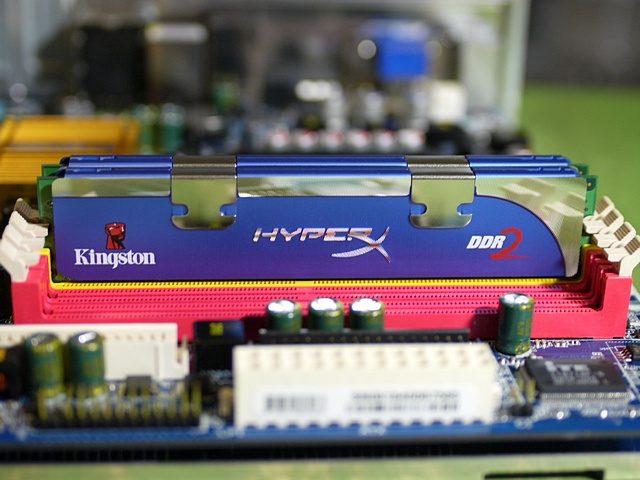
Kingston is one of the larger memory vendors and has long offered upgrade kits and enthusiast memory, along with related products such as flash memory devices.We are reviewing a  4 GB DDR2 memory kit,  HyperX kit with two 2 GB DDR2 DIMMs called KHX8500D2K2-4G, from which you can already tell these are PC2-8500 DIMMs (DDR2-1066 speed). The HyperX family is Kingston’s product line for enthusiasts, and there are DDR, DDR2 and DDR3 memory kits available. However, Kingston does not belong to the group of memory vendors that races for maximum clock speeds. This isn’t really a bad thing. In fact, Kingston is actually the only memory company that provides a truly solid technical specification sheet. You can get information on Kingston products on the corporate website www.kingston.com, while there is a microsite to deal with the HyperX line.


Package, Specifications

Believe it or not, we really liked the way Kingston boxed its memory. Both DIMMs fit into an anti-static plastic box with a clear cover, which is sealed with the product specifications. That’s not as fancy as a huge color box, but it’s as much as you really need to box a pair of memory modules. Both DIMMs are inserted in such a way that prospective buyers can examine the product stickers. These tell you about the part number and the voltage specification (2.2 V in the case of our test samples), but they don’t tell you anything about memory latencies. Only CL5-5-5-15 timings are supported, at 1.8 V default voltage or at 2.2 V maximum voltage. The SPD ROM is programmed to run the memory at DDR2-800 speed, 1.8 V and CL5-5-5-15 timings, which are the default values.


Overclocking

We started our overclocking attempts at the default DDR2-1066 voltage of 2.2 V, which didn’t take us much further than the default speed. However, a slight increase to 2.3 V helped to reach DDR2-1130 reliably. Any faster speed would result in the system becoming unstable.

Kingston provides an amazingly attractive price for performance within the expected range. If you can live with the fact that it doesn’t overclock much

Wednesday, October 13, 2010

I got a new phone

I was having issues with the nokia n97 browser and also with the software.
 Dont get me wrong its a great phone but it was not the perfect one for me as the software let it down. the hardware part was right but the software was weak. I have to do a lot of multitasking and it was giving me out of ram issue.!! So I had decided to get another phone to be my primary phone.
As you know really digging the nokia n900 Nokia's pocket computer and on using the device I was impressed.  And the device is a great for multitasking. So good that it can run 50 applications and still no lagg. How it is able to to do this is it has a total of 1gb or ram (256 fixed and 786 shared page). It is one of the only phones I have seen that has septate graphics and audio chip. so you can see its a real computer with phone built around it. There in lies the only problem. its great as a tablet and trust me there is nothing I found in the price range that can beat it. And trust me it totally kicks the apple Ipads butt. And there is nothing that can beat its multitasking capability. And the web browsing is the best you can ever find. That being said it lacks some basic stuff. you can say its rough around the edges. thats cause its a basic phone built around a computer.And there are some issues with the software. Like the music player is great but it lacks a equalizer. and many other bugs. You will say its Linux and you can program it easily but i am paying the full cost of the phone and why should i get a incomplete phone that i have to work on to complete.
  So then I was hunting for the new phone.. I wanted something that will let me work online just as good as on a pc, and it should also let me stay connected with my social accounts and my email. push mail to be precise and last and not the least let me stay online 24x7 on my IMs and skype calls .
  I got the answer in the form of Nokia E72. You might be thinking that i am only looking for Nokia.. no  I was in the market looking at every brand available, at prices till 1000$ and this was the best one i could get. and dint cost me much either. I have used the phone for a Day now and the phone is a great phone both as a phone and a internet device. The internet browser is so good on the phone that i am actually effortlessly creating this entire post on the device. The camera is a 5 mp and its really great. really impressed by it. the screen is very sharp.The phone easily fits into my pocket and is very light. It is a dream because of this. at the end of the day the more pocket-able the phone is the more easy you will use it. I am very happy with it so far.  Many people were saying that they are getting freezeups on the phone but I have not even had one yet. Its never given me out of ram issue like the nokia N97 and the battery life is very nice. The phone is able to do a lot of multitasking without a sweat. I was able to use nokia maps IM client , Mail client , music player , and web browser all together and  that dint cause any problems to the phone. Email client on the phone is a dream. navigation is very nice.and the phone is ready for all this out of the box and you dont have to install anything on the phone for all this stuff. Thats a good thing. The audio quality is better than many music phones and even standalone music players. so in short i am very happy with this phone... i will tell you more about it and my impressions and if any problems in a later post.

Saturday, October 9, 2010

Google Sync


Millions of people are addicted to using Gmail and a variety of other Google services such as Calendar and Contacts. If you’re one of them, you no doubt have wished for a way to wirelessly sync your phone to your computer.

Today Google has granted your wish in the form of Google Sync. If you have an iPhone, BlackBerry, Nokia Series 60, Windows Mobile, Sony Ericsson, or Nokia standard phone, you can now sync your Google Contacts and Calendar with your mobile phone of choice, wirelessly, and for free.

I’ve heard from a number of people already how great it is to finally sync their Google stuff wirelessly. The only caution that keeps coming up, though, is that Google wipes out your data on your device first, so make sure to run a backup before you use the software.

This is definitely interesting timing by Google especially since Microsoft mistakenly announced its new My Phone service, which will do the same and more, but just for Windows Mobile phones. Google’s offering covers a wide variety of phones, including Windows Mobile, so it will definitely be interesting to see what happens next.

I’ve been using Hosted Exchange for a while now. Since I pay for that service and Google’s and Microsoft’s new services are free, I think I’ll give them a shot and see how they compare.

It supports all kinds of phones and you can get your contacts from one platform to another without much issues,.. its a gr8 tool to manage your contacts and backup too.