Search This Blog
Followers
Blog Archive
Thursday, October 7, 2010
Olive pad
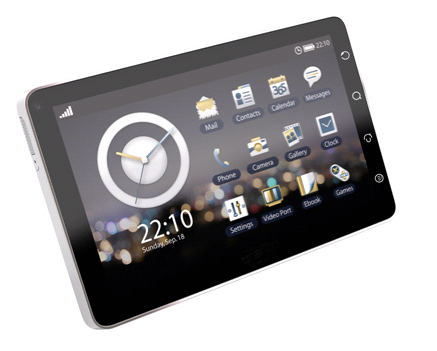
If you are looking to buy a small tablet like the ipad and dont want to be in the chains of apple or dont want to spend that much then the Olive pad is the product you will love
Olive is trying to set its presence in lucrative technology market of India. They introduced a series of mobile phones in India and then they come up with X107H Zip book. Recently they have announced to launch their first Android powered tablet / Slate in India. We are to take a quick review of this new gadget and evaluate its compatibility.
Structure;
Olive pad is equipped with 7 inch screen with a display of 800×480 pixels resolution with 65 K colours. Viewing screen from any angle is comfortable and the olive ipad also support multiple touches. Olive i-pad is very sleek and slim and can adjust in your rear pocket.
If we examine about the locations of the slots and keys, they are well placed and easily accessible. Micro Sd card slot, volume and zoom keys and sim slot are placed on the top of the stereo speakers. Below the speaker of the left side screen lock and power button are provided. 3.5 mm of handfree socket and mini USB port, located at bottom right side, acts as charging port. A 3 megapixel camera (autofocus) is placed at the rear, could be the major problem. Scratches can easily harm its quality. A 3240 mAh Li polymer battery is good.
Features:
Olive i-pad comes with a preloaded Android 2.1. The UI can be customised. Apps, games, UI add ons , social networking applications etc can be downloaded via Android market. It is also equipped with Qualcomm MSM7227 chipset with a 600 MHz processor. Typing is easy because of big screen and this feature further helps in abstracting all the benefits of the Android 2.1 engine.
Media interface and Calls:
You have to use a hand free kit for the receiving calls. Built in speakers are good but microphone is not much supportive. Olive I Pad also has A2DP (stereo Bluetooth) but it drains out your battery life. Peak volume of the speakers is not enough in crowed area. It is easy to sync your music files in any format with Android Music player. MPEG4 and 3GP format videos are acceptable but there is need to convert video for better fit with the size of screen. Gaming is still a area to put emphasis.
Connectivity:
Olive i-pad is a 3.5 g enable device withn options of EDGE/GPRS. Wi-Fi connectivity, and pre installed applications for social networking, Gmail, Gtalk, Twitter and Facebook are excellent travel mate. GPS is another worthy feature. Word documents can be created and PDF reader is also available. Price of Olive ipad is in range of Rs 22000-Rs 25000.
Sony Ericsson Zylo (W20)
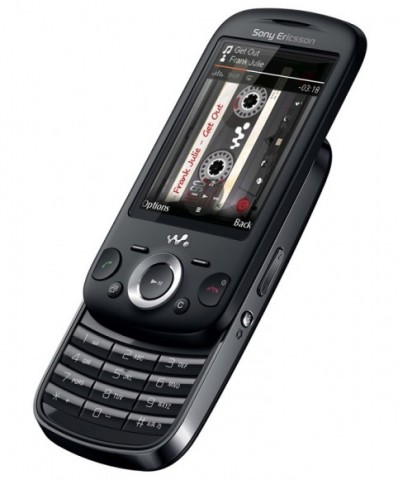
If you like small phones that you can carry around and listen to music and take decent photos and don't want to break the bank then this is the phone you have been looking for. Take a look at the features
Key factors :
Camera 3MP
Bluetooth with A2DP, Yes
Music Player Yes
FM Radio Stereo FM radio with RDS
GPRS Class 10, Yes
EDGE Class 11, Yes
Talk Time up to 5 hours
Video Yes
Form Factor Slider
Wi-Fi No
Phone Book capacity 2000
Memory up to 16GB
Phone Features
Size 103X52X11.5mm
Weight 115 gms
Display Size 2.6 inch
Display Colours 256K TFT
HSC SD NA
Call Records Yes
Ringtones MP3 & MIDI
Network Quad Band & 3G
Standby time Up to 170 Hours
Battery Standard, Lithium
Games 3D, Yes
Java Tech MIDP 2.0
3G Yes (HSDPA)
SMS Yes
MMS Yes
E-mail Yes
WAP Yes
USB cable connection Yes
Operating System JAVA
Head-set Yes
Speaker Phone Yes
GPS No
Geo tagging Yes
Key factors :
Camera 3MP
Bluetooth with A2DP, Yes
Music Player Yes
FM Radio Stereo FM radio with RDS
GPRS Class 10, Yes
EDGE Class 11, Yes
Talk Time up to 5 hours
Video Yes
Form Factor Slider
Wi-Fi No
Phone Book capacity 2000
Memory up to 16GB
Phone Features
Size 103X52X11.5mm
Weight 115 gms
Display Size 2.6 inch
Display Colours 256K TFT
HSC SD NA
Call Records Yes
Ringtones MP3 & MIDI
Network Quad Band & 3G
Standby time Up to 170 Hours
Battery Standard, Lithium
Games 3D, Yes
Java Tech MIDP 2.0
3G Yes (HSDPA)
SMS Yes
MMS Yes
E-mail Yes
WAP Yes
USB cable connection Yes
Operating System JAVA
Head-set Yes
Speaker Phone Yes
GPS No
Geo tagging Yes
Sunday, October 3, 2010
Alienware M11x Review
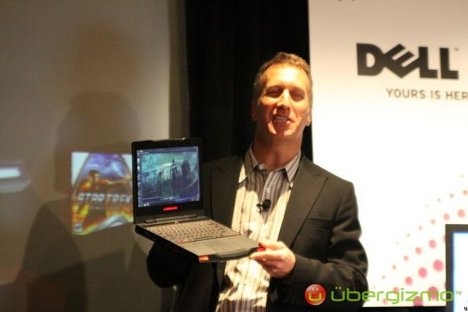
One of 2010's laptop surprises, the Alienware M11x offered something new to challenge the divide between gaming PCs and regular computers. Pairing gaming graphics with a compact Netbook-size body for a starting price less than $1,000, and battery life that was actually good, this travel-friendly "gaming Netbook" redefined our expectations of what a portable computer could offer.
There were a few drawbacks: in our original review of the Alienware M11x, we noted that the gaming capabilities were good but not great. With a Core 2 Duo ULV CPU, it was a far cry from the blazing speed of its full-fledged and more expensive big brother, the Alienware M15x, and the processor's general capability to multitask was considerably slower than even the lowest-end versions of Intel's new Core i3/i5 laptop processors.
Dell's new iteration of the Alienware M11x, equipped with Intel Core i5 and i7 ULV processors and automatically switching Nvidia graphics with Optimus technology, are now available alongside the original M11x for a slightly higher price. The specs raised expectations for both increased speed and battery life in our review unit, which had a Core i7-U640 CPU and cost $1,299.
Though the new Core i7 ULV version of the Alienware M11x does offer improved operating speeds and frame rates for games, it's not a quantum leap. It's better than its predecessor, but its higher price may scare away mainstream gamers or people looking for better laptop value for their money. Still, if you want a nearly unmatched size-graphics combination, this could be the hybrid you're looking for. If you'd like to save a few hundred dollars, consider giving the still-available Core 2 Duo version of the M11x (which starts at $799) a look. The new Core i5/i7 iterations of the M11x start higher, at $949.
Price as reviewed / starting price $1,299/$949
Processor 1.2 GHz Intel Core i7 U640
Memory 4GB, 800 MHz DDR3
Hard drive 500GB 7,200rpm
Chipset Mobile HM55
Graphics Nvidia GeForce GT 335M (1GB) + Intel GMA HD
Operating System Windows 7 Home Premium (64-bit)
Dimensions (WD) 11.3 inches x 9.2 inches
Height 1.3 inches
Screen size (diagonal) 11.6 inches
System weight / Weight with AC adapter 4.6 / 5.6 pounds
Category Ultraportable
The Alienware M11x is still a relatively thick ultraportable, especially considering that it lacks an optical drive, but the compactness of the Alienware M11x as a gaming machine is hard to beat. Its look is a lot cleaner and more streamlined than larger Alienware products, such as the M15x. Our black model (last time, we reviewed the M11x in silver gray) has a smooth, soft feel and a matte finish. The M11x gives away its Alienware pedigree via a subtle, black, alien-head logo on the back lid, a trademark alien skull above the keyboard, and its racecar-like front face, with somewhat silly LED "headlights." To some degree, the squared-off, bottom-heavy look of the M11x resembles an old-school portable DVD player. Its all-around clean lines make it an easy laptop to slide into a bag.
Opening up smoothly on a plastic hinge that protrudes from an otherwise flush backside, the M11x interior is all black, with a very familiar LED-backlit, multicolor keyboard and an edge-to-edge, glossy, 11.6-inch screen. The sturdy chassis and slightly compressed, but otherwise Alienware-quality, keyboard are much better than average, as is the comfortable, large touch pad. Much like other Alienware laptops, the bold-colored keyboard, grille, and Alienware logo lights can be customized in any of a rainbow of colors, or even set to strobe if you prefer. These effects are set using Alienware apps.
The M11x's 11.6-inch, 1,366x768-pixel resolution screen looks good behind its edge-to-edge glossy veneer, but all that glass on a small screen results in quite a bit of glare, too. With its screen size, the M11x seems made to be plugged into an external monitor, but the 11.6-inch display is actually surprisingly decent for gaming. An immersive assist comes from above-average built-in 5.1 speakers, an astounding array for the M11x's size. Game sound comes off crisp, loud, and good enough to enhance the gaming experience on its own. At maximum volume, the M11x can nearly rock a room.
The M11x still lacks an optical drive; that's an obvious decision to enable this laptop to be so small, but we couldn't help notice the M11x's conspicuously port-free stretch on its right side, which is about the same size as, well, an optical drive. We'll let you draw your own conclusions. While the capability to install games off discs without having to plug in a USB-connected external optical drive would be nice, modern gamers using Steam (preinstalled on the Alienware) or other downloadable software probably never touch discs most of the time anyway.
Alienware M11x Average for category [Ultraportable]
Video HDMI, DisplayPort VGA plus HDMI or DisplayPort
Audio Stereo speakers, dual headphone jacks, microphone jack Stereo speakers, headphone/microphone jacks
Data 3 USB 2.0, dual SD/Memory Stick card reader, mini-Firewire 3 USB 2.0, SD card reader
Expansion None None
Networking Ethernet, 802.11 b/g/n Wi-Fi, Bluetooth, 3G broadband Ethernet, 802.11n Wi-Fi, Bluetooth, optional mobile broadband
Optical drive None None
Speaking of missing ports, the most impressive feature on this tiny laptop is its support of both HDMI and DisplayPort. VGA has oddly been removed this go-around, though the original M11x boasted all three video options. We do not often use a DisplayPort, and we think VGA might have been a more versatile connection. No ExpressCard slot is provided, but at least the M11x includes Bluetooth (though you can optionally save $20 and leave it out when ordering on Dell's Web site). Our configuration also included Gobi Mobile Broadband supporting Verizon, an $125 extra (an AT&T Gobi card is also available), which also requires a monthly data subscription starting at $39.99.
Under the hood, the new Alienware M11x configurations use either a Core i5 or i7 ULV processor, which amounts to Intel's next-gen evolution of the SU7300 Core 2 Duo ULV CPU that was in the last Alienware M11x we reviewed. The Core 2 ULV M11x is still available from Alienware at a starting price of $799. The new configs start at $949, which gets you a 1.06 Ghz Core i5 520UM ULV processor, 2GB of DDR3 RAM, and a 160GB hard drive. Our top-of-the-line configuration came to slightly more, at $1,299. Upgrading from a Core i5 520UM to the Core i7 640UM CPU costs $150.
The Intel Core i7 640UM processor under the hood of our Alienware M11x is a Core i7 in brand name only: running at half the speed of a normal processor but overclockable in BIOS, the performance of this low-voltage CPU is more akin to what we saw in the Core 2 Duo ULV processor, the SU7300, than what you're likely to get in any other Core i7 machine. This M11x does run faster and better at both single and multitasking benchmarks than its predecessor--about 27-percent faster than the Core 2 Duo ULV M11x in our multitasking benchmarks, for instance--but it still lags behind standard-voltage Core i-series processors. That being said, it's plenty fast for accomplishing most tasks, especially on its smaller 11.6-inch screen.
A powerful but not top-of-the-line Nvidia GeForce GT 335M graphics card with 1GB of RAM is the M11x's real secret weapon, giving it enough gaming power to handle most mainstream titles. The older version of the M11x used switchable graphics to alternate between discrete power and battery-saving integrated Intel graphics, but the software switch was manually operated. This M11x finally has newer on-the-fly Optimus graphics-switching technology, which handles the graphics switch seamlessly for the most part. The effect is invisible, except in a few instances: a demo of Kane & Lynch 2 didn't trigger a graphics switch-over, which requires right-clicking on the .exe file to add the profile to Nvidia's Optimus settings. (Optimus keeps an updated profile library for all programs for which it needs to activate graphics.)
In addition to making things a little easier, the new graphics setup performed better than the original M11x. The current M11x ran Unreal Tournament III's benchmark test at 84.2 frames per second in native 1,366x768-pixel resolution, as opposed to 69.5fps from the Core 2 Duo ULV M11x. We also tried Mass Effect 2 and Kane and Lynch 2 and found them to run excellently. The M11x isn't a top-flight gaming laptop, because of its slower-than-average ULV processor and just-short-of-elite graphics, but for its size it can't be beaten.
The M11x also outputs to external monitors at up to 1,920x1,080-pixel resolution, via HDMI or DisplayPort-out (VGA has been removed from the Core i5/i7 M11x). Our results were a little better than they were on the original M11x, as would be expected; full 1080p gaming on Mass Effect 2 wasn't buttery smooth, but 1,600x900-pixel resolution looked surprisingly strong.
So in short this is a must have for any Gamer. and this is the smallest true gaming laptop that you can buy. It is a bit on the expensive side but who said that the best things in life have to be cheap.
Friday, October 1, 2010
Nokia ovi store hits 2.3 million daily
After almost a year and a half, Nokia's Ovi Store has built up enough momentum to hit 2.3 million daily downloads, the company announced today.
With the number of active Nokia phone customers at 140 million around the world, 200,000 users are now signing up at the Ovi Store on a daily basis, Nokia noted.
Among the developers and publishers who create the mobile apps, 70 of them have gone past 1 million downloads. It's a list that includes Electronic Arts, Gameloft, Indiagames, PepsiCo, HeroCraft, and Offscreen Technologies. HeroCraft's Farm Frenzy game has enjoyed more than 10 million downloads, according to Nokia, while Offscreen's touch-screen apps have taken home more than 45 million downloads.
Launched in May 2009, the Ovi Store was designed to be Nokia's answer to Apple's App Store. But Nokia's app store has received some dings for its lack of user friendliness. The company just revamped the look and feel of the Ovi Store, initially seen only through the new N8 smartphone and then rolling out to other Symbian smartphones. The new store promises a friendlier experience and easier ways to track down content.
The Ovi Store has also typically lacked the wealth and depth of apps found in Apple's App Store and even Google's Android Market. One problem is that developers have been more keen to create mobile apps for the lucrative iPhone and Android platforms. To counter that, Nokia has been providing developers with new tools and benefits, improved revenue sharing, better analytics, and easier ways for users to buy their apps.
Another problem is that Nokia has focused on its global business at the expense of the U.S. and North American markets. To attract more developers and reach out to this market all in one shot, Nokia recently announced a $10 million contest to encourage developers to create apps specifically for customers in North America.
Thursday, September 30, 2010
Everest software
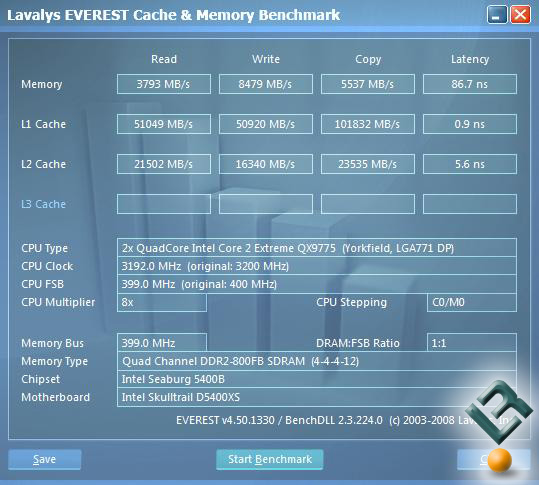
EVEREST Home Edition is a free system diagnostics, system information and benchmarking solution for home PC users, based on the award-winning EVEREST Technology.
It offers the world's most accurate system information and diagnostics capabilities, including online features, memory benchmarks, hardware monitoring, and low-level hardware information.
Motherboard & CPU - Accurate low-level information about motherboard, CPU and BIOS, including chipset details, DMI enumeration, AGP configuration information, SPD memory modules list, DRAM timing information and CPU instruction set support.
Video adapter & monitor - Detailed information about the video adapter, video drivers and monitor, including DDC information, monitor serial number and supported video modes detection, low-level GPU details, OpenGL and Direct3D features list.
Storage devices - Information about all hard disk and optical disk drives, including IDE autodetection, S.M.A.R.T. disk health monitoring, ASPI SCSI devices list and partitions information.
Network adapters, multimedia, input devices - Exhaustive information about network adapters, sound cards, keyboard, mouse and game controllers, including NIC MAC address detection, IP and DNS list, network traffic monitoring, DirectSound, DirectMusic and DirectInput information.
Misc hardware - Information about PCI, PnP, PCMCIA and USB devices, communication ports, power management information, device resources list, printers information.
Operating system - Detailed Windows information, including operating system installation date and product key, system services and system drivers list, process information, installed patches list, environment variables list, system folders list and system files content.
Server and display - Information about network shares, users and groups list, logged on users list, fonts list and Windows desktop configuration details.
Networking - Large amount of information about networking status, remote access and mailing accounts, network resources and Internet settings.
Installed software - Detailed information about installed programs, scheduled tasks, startup programs and anti-virus solutions.
Hardware monitoring - Sensor information including system and CPU temperature, fan status, CPU, AGP and DRAM voltage monitoring, S.M.A.R.T. disk health status.
Benchmarking - Memory read and write speed measurement to stress the memory and cache subsystem, including references list to compare actual performance with other systems.
Tips & suggestions - Detection of possible hardware and software misconfiguration and compatibility issues.
Report Wizard - Easy-to-use method to produce report files of the system, by either using pre-configured report profiles or custom selection of information.
Report formats - Three different report file formats: plain text, customizable HTML and the unique MHTML format. MHTML reports including icons are ideal for printing purposes.
Report e-mailing and printing - Built-in e-mail transfer client using SMTP, also support for MAPI and Outlook protocols. Instant report display and one-click printing capabilities using IE4+ technology.
Here are some key features of "Everest Home Edition":
· Full hardware information
· DirectX information
· Overclock information
· UPS, tape drive support
· Diagnostics module
· Benchmarks
· Tweaking features
· Web links
· Favorite pages
· Built-in hardware database
· Full Windows XP compatibility
· Full Windows Server 2003 compatibility
· Fully localized user interface (27 languages).
You will be happy with it if you are a normal person, But if you are a serious overclocker or a gamer then buy the pro version like me....
Tuesday, September 28, 2010
prevent you pc being hacked
There are many ways when a hacker would try to scam you into receiving a file etc, so that you will take the bait and help him with the trojan/virus installation on your hard disk drive. If you need just one way to stop being hacked, the best way is to install an all-in-one solution with anti-virus, firewall and anti-spyware solution.
We personally use Norton Internet Security and we update our subscription every year. Another similar product which you may consider is ZoneAlarm, but we recommend Norton for their years and track records in the anti-virus arena. btw, we don't get commission for recommending, so you can trust our advise. Not to forget that I am a trained hacker myself.
Nevertheless, you must know that whether or not your PC will be hacked will depend very much on your actions as well. For example, downloading files from warez sites and poor habits of opening up strange email attachments, is as good as inviting hackers to break your door. Some time ago, I have the opportunity to try removing a malignant spyware installed on a friend's machine. It took me 8 hours despite my experience, and eventually we had to reinstall the entire OS. Some of you might say that I should have reinstall it after a short tryout, however, I preferred to take the challenge but failed. :)
Prevention is always better than cure. If you would like to take the risk, a common practice (for some of us) is to use another PC when we need to do something risky. With constant PC upgrades, many of us could easily keep an older PC (at least one) just for this purpose. This reminds me of the hacking class that I attended a few years back - the instructor had to reinstall all the workstations almost every lesson to get rid of the remaining virus or trojans from the previous lessons.
Another way of getting into trouble is to visit cracks, warez, and keygen websites. There are several ways which your PC may be infected:
1) Clicking on buttons on the site which activates malicious scripts, including Scareware windows.
2) Trojans, virus or spyware hidden in the software cracks, or keygen.
3) Trojans, virus, or spyware hidden in attachments of emails, and this include pictures.
Althought we did mention earlier that you must have at least one security software installed on your PC, however, it is impossible to guarantee that the software will definitely protect you against Any or All the possible viruses, trojans and malicious programs.
If you find that your PC behaves abnormally, such as unexpected pop-up ads, shutting down of applications, poor internet connections (or busy connections), etc, there is a good chance that your PC is infected. You will need to waste quite a bit of time to perform a complete PC scan, try to locate and remove the infected file, or to reformat and reinstall the entire harddisk again. Again, prevention is always better than cure, so backup your data at all times. Some virus does more than simply shutting down your PC, they can damage your hard disk physically by force writing over a specific sector repeatedly within a very short time. We will not go into that.
We will summarize the 3 generic recommendations below.
Install a good internet security software (currently Norton 360 is recommended) and pay for the auto-update. This is important.
Do not visit high-risk websites or click on any of the links there.
While it cannot guarantee 100% that your PC/laptop would be free from intrusions, it would lower the chances of it happening significantly.
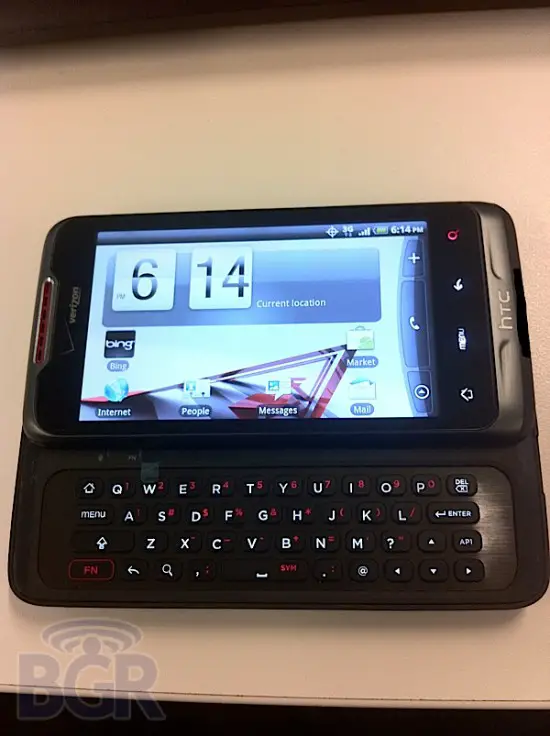
Htc qwerty android phone
Verizon has always had a tough time keeping the details and images of its upcoming phones under the wraps. This time, it's an HTC handset running Android and sporting a full QWERTY keyboard that has got leaked by BoyGeniusReport (BGR). Bearing a form factor similar to HTC's T-Mobile branded G2 handset, the new QWERTY keyboard boarding HTC handset carries model name ADR6325.
This HTC ADR6325 will come preloaded with Android Froyo 2.2 update. This full QWERTY Android handset will sport a 5 megapixel camera.
HTC ADR6325 smartphone doesn't have five-way navigation providing D-pad like the one in G2. As of now, we aren't aware of the branding but this phone would be released globally for GSM users as well alongside Verizon's branding.
Subscribe to:
Posts (Atom)